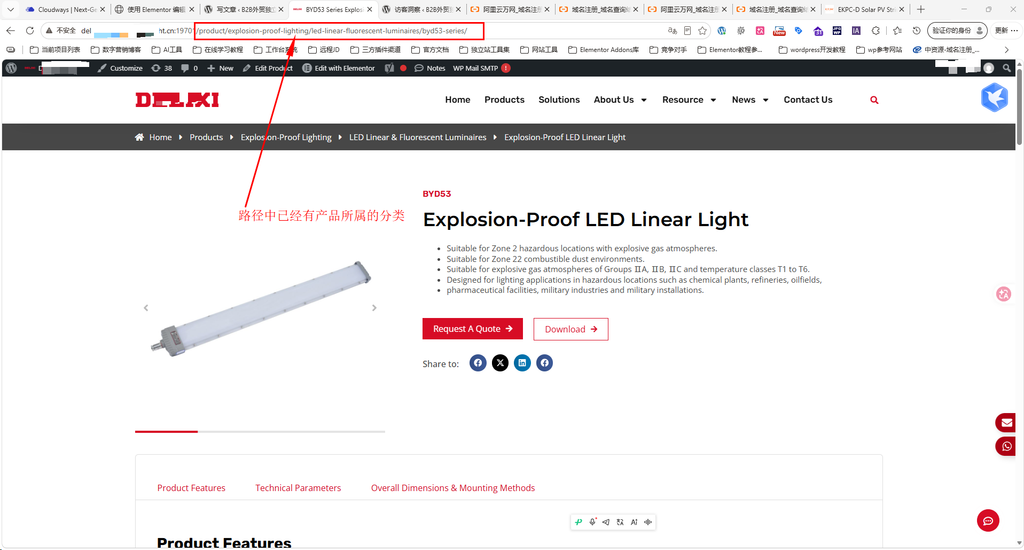
wp自定义products类型,上传产品添加在指定分类下面,打开产品详情页时,浏览器路径中没有产品所属的分类
问题:通过自定义的Products类型,上传产品后固定链接没有关联产品分类的层级结构。打开产品详情页后路径:/product/bdmx-series/, 需要把产品所属分类也添加上/products/一级分类/二级分类/bdmx-series/
方案:
可以通过WP的post_type_link和add_rewrite_rule让 WordPress 能够正确解析新 URL。
复制下面的代码到functions.php文件中,代码添加后到后台设置->固定链接重新保存即可生效
/**
 * Products CPT: Include hierarchical product taxonomy
 * in single product permalinks.
 */

// 1. Generate hierarchical product permalink.
add_filter('post_type_link', function ($permalink, $post) {

    if ($post->post_type !== 'products') {
        return $permalink;
    }

    $taxonomy = 'product_cat';

    $terms = get_the_terms($post->ID, $taxonomy);

    if (empty($terms) || is_wp_error($terms)) {
        return $permalink;
    }

    // Select the deepest assigned category.
    usort($terms, function ($a, $b) use ($taxonomy) {
        $depth_a = count(get_ancestors(
            $a->term_id,
            $taxonomy,
            'taxonomy'
        ));

        $depth_b = count(get_ancestors(
            $b->term_id,
            $taxonomy,
            'taxonomy'
        ));

        return $depth_b <=> $depth_a;
    });

    $term = $terms[0];

    // Get parent category hierarchy.
    $ancestors = array_reverse(
        get_ancestors(
            $term->term_id,
            $taxonomy,
            'taxonomy'
        )
    );

    $slugs = [];

    foreach ($ancestors as $ancestor_id) {
        $ancestor = get_term($ancestor_id, $taxonomy);

        if ($ancestor && !is_wp_error($ancestor)) {
            $slugs[] = $ancestor->slug;
        }
    }

    $slugs[] = $term->slug;

    $category_path = implode('/', $slugs);

    return home_url(
        '/product/' . $category_path . '/' .
        $post->post_name . '/'
    );

}, 10, 2);

// 2. Register rewrite rules.
add_action('init', function () {

    add_rewrite_rule(
        '^product/(.+)/([^/]+)/?$',
        'index.php?post_type=products&name=$matches[2]',
        'top'
    );

}, 20);
最终效果如图所示