Elementor Loop Grid动态读取自定义Solution-Category分类页上的ACF Relationship字段:recommended_products字段(需手动指定产品)
问题:默认的Elementor Pro无法读取ACF的Relationship字段
方案:
解决方案一:安装插件(Repeaters & Relationships Connector with ACF for Elementor)
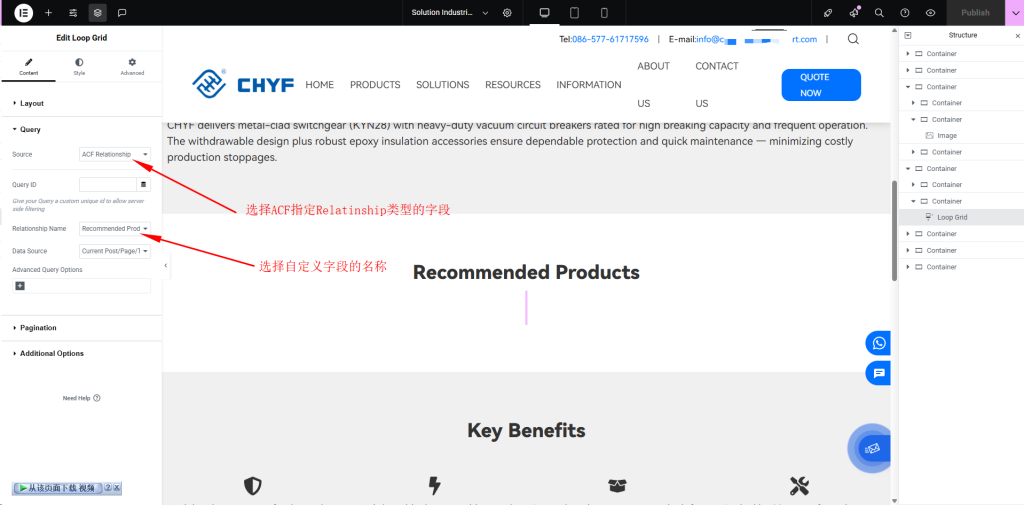
直接在Query的Source中选择ACF Relationship类型字段,选取Relationship Name: 下拉选取自定义的recommended products字段名,网页前端就可以正常显示。
解决方案二:
通过自定义Query ID指定自定义查询名称, post type选择自定义Product类型,Query Id: recommended_products
add_action( 'elementor/query/recommended_products', function ( $query ) {

    if ( ! is_tax( 'solution-category' ) ) {
        return;
    }

    $term = get_queried_object();

    if ( ! $term instanceof WP_Term ) {
        $query->set( 'post__in', array( 0 ) );
        return;
    }

    $products = get_field(
        'recommended_products',
        $term
    );

    if ( empty( $products ) || ! is_array( $products ) ) {
        $query->set( 'post__in', array( 0 ) );
        return;
    }

    $product_ids = array();

    foreach ( $products as $product ) {

        if ( $product instanceof WP_Post ) {
            $product_ids[] = (int) $product->ID;

        } elseif ( is_numeric( $product ) ) {
            $product_ids[] = (int) $product;
        }
    }

    if ( empty( $product_ids ) ) {
        $query->set( 'post__in', array( 0 ) );
        return;
    }

    $query->set( 'post_e', 'product' );

    $query->set(
        'post__in',
        $product_ids
    );

    $query->set(
        'orderby',
        'post__in'
    );

} );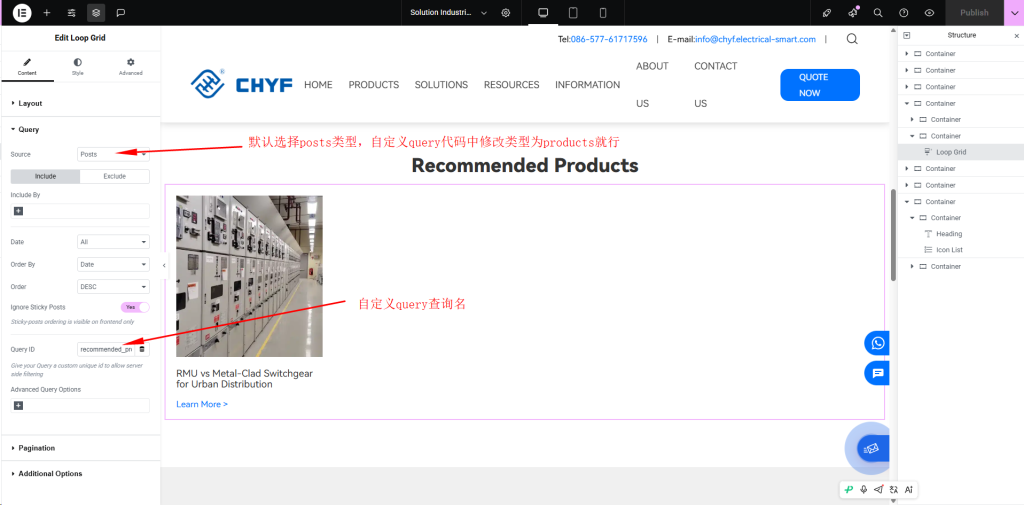
注意点:Source可以直接选择自定义product类型,主要编辑器中可以直接看到产品样式,如果选Posts,因为默认的Posts列表里没有上传产品,所以显示为空。但前端显示无论选哪个类型,都会正确显示。