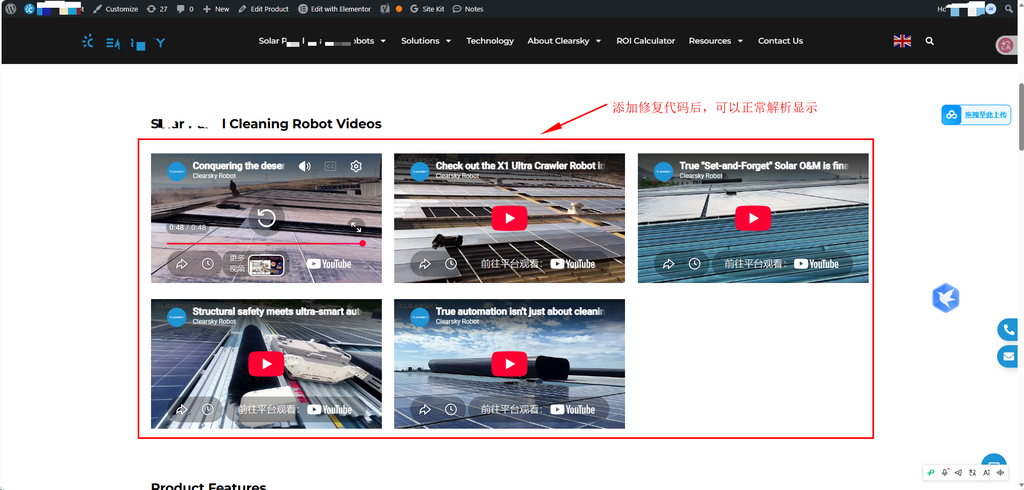
WP区块编辑器内嵌入youtube显示正常,前端却只显示链接,看不到视频
问题:上传新闻稿时,新闻详情页嵌入youtube视频来介绍相应的产品,在WP区块编辑器内嵌入youtube可以正常播放和显示,发布后到前端发现只显示出视频的链接,看不到视频
方案:
在主题的function.php中,添加youtube自动解析生成iframe代码,原理就是默认显示新闻详情页时,Youtbe block元素解析失败,导致没有生成iframe。添加如下代码,可以再次验证详情页中是不存在没有转换成功的youtube链接
/**
 * Fix YouTube Gutenberg Embed rendering
 *
 * Theme: Astra Child
 * Builder: Elementor Pro
 *
 * Only process Gutenberg core/embed YouTube blocks.
 */

 add_filter('render_block', 'chyf_fix_youtube_embed_render', 20, 2);

 function chyf_fix_youtube_embed_render($block_content, $block) {

     // Only process Gutenberg Embed blocks.
     if (
         empty($block['blockName']) ||
         $block['blockName'] !== 'core/embed'
     ) {
         return $block_content;
     }

     // Skip if an iframe already exists.
     if (strpos($block_content, '<iframe') !== false) {
         return $block_content;
     }

     // Get original embed URL.
     $url = $block['attrs']['url'] ?? '';

     if (empty($url)) {
         return $block_content;
     }

     // Only process YouTube URLs.
     $host = strtolower(
         parse_url($url, PHP_URL_HOST) ?? ''
     );

     $allowed_hosts = array(
         'youtube.com',
         'www.youtube.com',
         'm.youtube.com',
         'youtu.be',
         'youtube-nocookie.com',
         'www.youtube-nocookie.com'
     );

     if (!in_array($host, $allowed_hosts, true)) {
         return $block_content;
     }

     // Request YouTube embed HTML.
     $iframe = wp_oembed_get($url);

     if (!$iframe) {
         return $block_content;
     }

     // Replace URL inside Gutenberg embed wrapper.
     $updated_content = str_replace(
         $url,
         $iframe,
         $block_content
     );

     return $updated_content;
 }

最终显示效果如图所示,前端正常显示